> ## Documentation Index
> Fetch the complete documentation index at: https://moengage-sdk-docs.mintlify.site/llms.txt
> Use this file to discover all available pages before exploring further.
# Data Overview
> Sending events and user details from your servers to the MoEngage servers using the MoEngage Data APIs.
## Data API Endpoints
Data API is a collection of the following APIs:
* [Track User](https://moengage.mintlify.app/api/user/track-user)
* [Get User](https://moengage.mintlify.app/api/user/get-user)
* [Merge User](https://moengage.mintlify.app/api/user/merge-users)
* [Delete User](https://moengage.mintlify.app/api/user/delete-users-in-bulk)
* [Create Event](https://moengage.mintlify.app/api/event/create-event)
* [Track Device](https://moengage.mintlify.app/api/device/track-device)
* [Device Opt-out](https://moengage.mintlify.app/api/device/device-opt-out)
* [MoEngage Streams](https://moengage.mintlify.app/api/webhooks/moengage-streams-webhook)
* [Bulk Import](https://moengage.mintlify.app/api/bulk/bulk-import-users-and-events)
* [Trigger File Imports](https://moengage.mintlify.app/api/file-import/trigger-file-imports)
* [Import Details](https://moengage.mintlify.app/api/file-import/import-details)
* [Import File Run History](https://moengage.mintlify.app/api/file-import/import-file-run-history)
* [Install Tracking](https://moengage.mintlify.app/api/tracking/track-app-install)
* [Test connection](https://moengage.mintlify.app/api/utilities/test-api-connection)
* S3 Data Import
For workspaces in MoEngage with the User Identity Resolution feature enabled, the following Data APIs can be used to create or update users using a specific identifier, such as a mobile number or email ID, as configured in **Settings** > **Data** > **Identity Resolution**:
* Track User
* Create Event
* Bulk Import
For more information, refer to [User Identity Resolution](https://help.moengage.com/hc/en-us/articles/24050999467284-Unified-Identity-Identity-Resolution).
In MoEngage, data ingestion uses *ID* by default to create or update a user. For workspaces in MoEngage with Identity Resolution enabled, Data APIs (Track User, Create Event, Bulk Import) can be used to create or update users using a specific identifier, such as a mobile number or email ID, as activated in the Identity Resolution dashboard.
You can:
* Create users through Server-to-Server Data APIs even when they do not have an ID (but have other identifiers).
* Create a user or track events of a user when identifiers other than ID (for example, email ID or phone number) are known.
## Request Headers
| Header | Sample Value | Description |
| :------------ | :-------------------------------------------------------------- | :---------------------------------------------------------------------------------- |
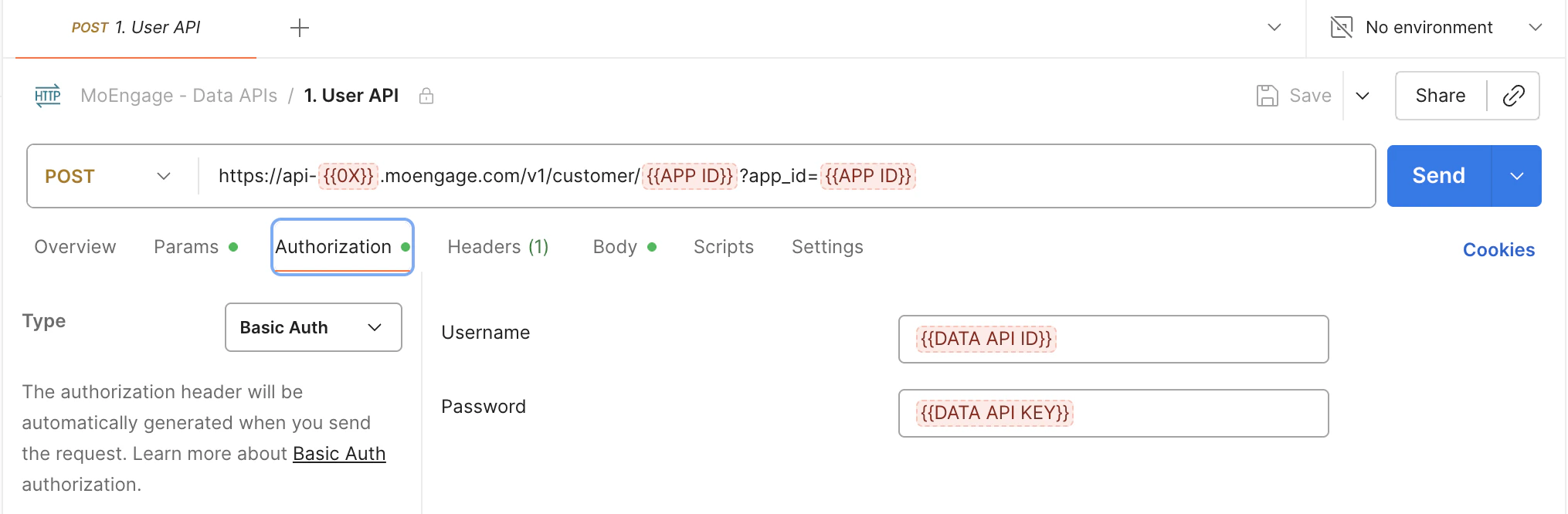
| Authorization | `{"Authorization": "Basic Base64_ENCODED_WORKSPACEID_APIKEY="}` | Basic authentication is used for access control. |
| Content-Type | `{"Content-Type": "application/json"}` | Set the Content-Type header to application/JSON for using the Data API. |
| MOE-APPKEY | `{"MOE-APPKEY": "Workspace ID"}` | Set the MOE-APPKEY header available at Settings > Account > APIs > API Keys > Data. |
## Authentication
After you generate and save the Data API Key, DO NOT generate a new key unless there is a security breach. Once you generate a different Data API key and save it, your existing data tracking will need to be updated, as the authentication will start failing.
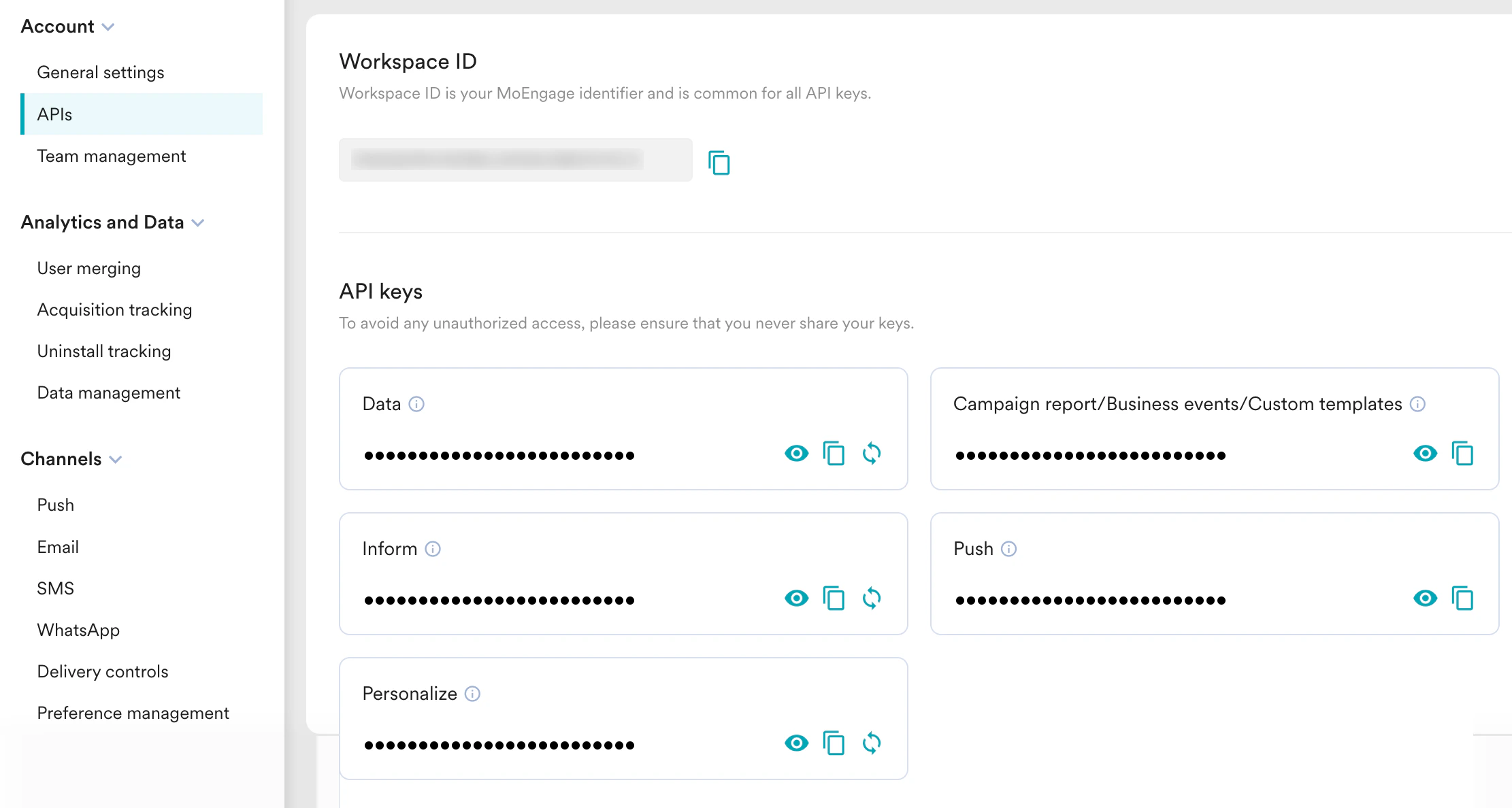 Authentication is applicable to the Create User, Create Event, and Bulk Import APIs. Authentication is performed using a client like Postman as follows:
 ## Request Body
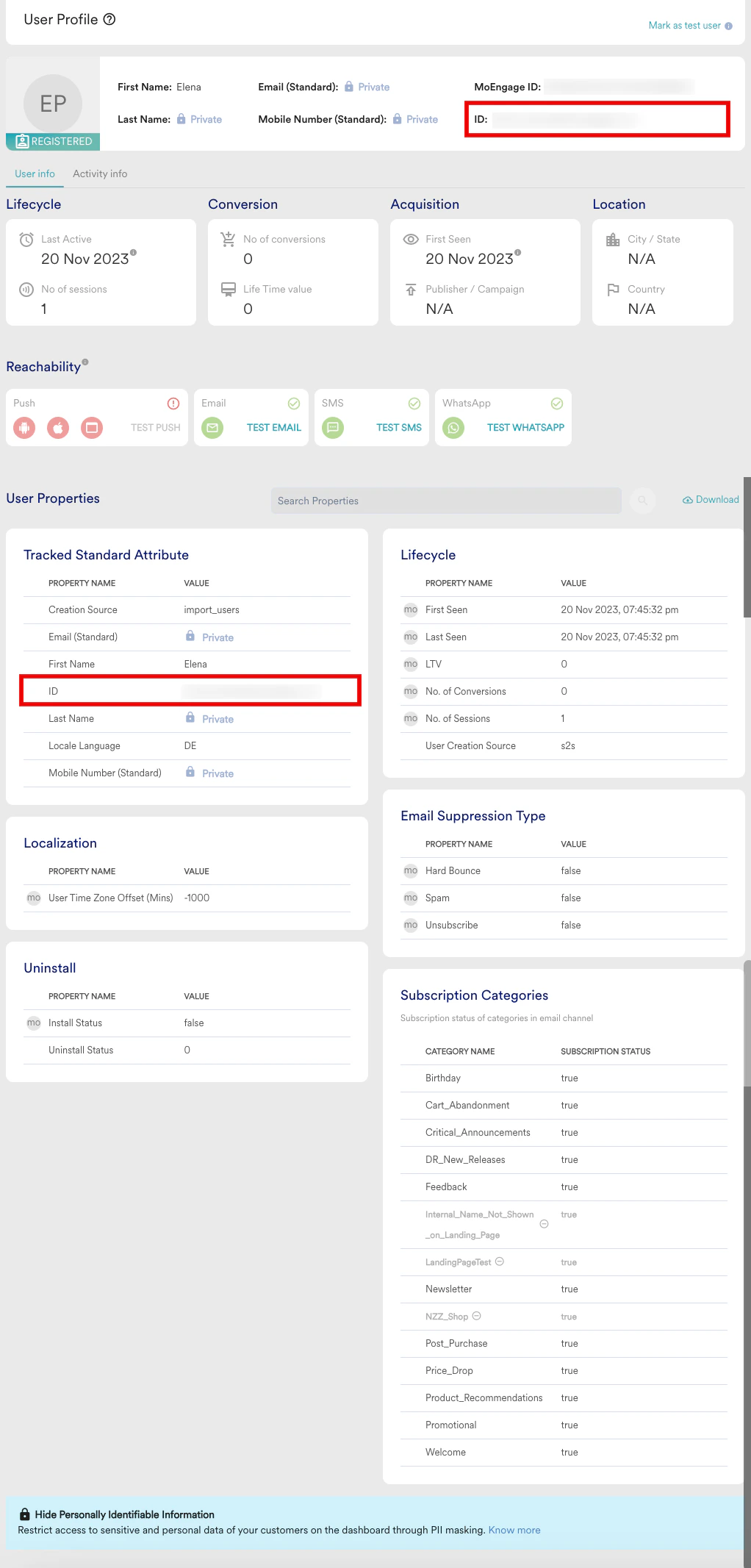
The request body contains the mandatory field called `customer_id`. `customer_id` is the unique identifier set and passed on from the MoEngage SDK as `USER_ATTRIBUTE_UNIQUE_ID` and is visible on the dashboard as `ID`.
`customer_id` is used to:
* Identify or create a user in MoEngage
* Associate the events with the corresponding unique user profiles in MoEngage.
On receiving a Data API request in MoEngage, the `customer_id` is used to verify if the user exists in MoEngage. If the user does not exist, a new user is created with the attributes or events.
* The maximum limit for the request body is 128 KB.
* Any string of more than one characters is allowed for `customer_id` except the following values - \['unknown', 'guest', 'null', '0', '1', 'true', 'false', 'user\_attribute\_unique\_id', '(empty)', 'na', 'n/a', '', 'dummy\_seller\_code', 'user\_id', 'id', 'customer\_id', 'uid', 'userid', 'none', '-2', '-1', '2']
For example, a user created using the following request is visible in the dashboard user profile as displayed.
## Sample Request Body
Below is a sample request body for the Create User API:
```json theme={"theme":{"light":"github-light","dark":"github-dark"}}
{
"type": "customer",
"customer_id": "USERID1234",
"attributes": {
"first_name":"John",
"name":"John Smith",
"plan_expiry_date":"2020-05-31T00:00:00Z",
"super_user":true,
"user_persona":"browsers",
"platforms" : [{"platform":"ANDROID", "active":"true"}]
}
}
```
You can not use "moe\_" as a prefix while naming events, event attributes, or user attributes. It is a system prefix and using it might result in periodic blacklisting without prior communication.
## Supported Datetime Formats
You can pass the datetime in the following formats in the request body:
| Datetime Format | Example |
| :------------------------------------------- | :------------------- |
| `“datetime_format”:YYYY-MM-DD[T]HH:mm:ss[Z]` | 2019-03-12T17:36:05Z |
| `“datetime_format”: "YYYY-MM-DD"` | 2022-01-22 |
MoEngage performs the following validation on datetime formats before ingesting data into its system:
* Future and past date values are accepted and ingested.
* Any date values with incorrect calendar values (e.g., 2019-15-12 where 15 is not a valid month) are ingested as strings.
* Any datetime values incompatible with the formats mentioned above are converted to strings and then ingested.
## Response
Response to the Data API is a JSON object. On a successful data API request, you will receive the following response:
```json theme={"theme":{"light":"github-light","dark":"github-dark"}}
{
"status": "success",
"message": "Your request has been accepted and will be processed soon.",
"request_id": "kXwpDESb"
}
```
On a failed data API request, you will receive the following response:
```json theme={"theme":{"light":"github-light","dark":"github-dark"}}
{
"status": "fail",
"error": {
"type": "TypeError",
"message": "expected string",
"request_id": "kXwpDESb"
}
}
```
## Response Codes
The following status codes and associated error messages are returned when the request results in a fatal error.
| Error Code | Type | Message | Description |
| :--------- | :---------------------------- | :--------------------------------------------------------------------------------- | :----------------------------------------------------------------------------------------------------------------------------------------------------------- |
| 400 | Missing header value | The Content-Type Header is required | The header value for content type is missing |
| 400 | Empty request body | A valid JSON document is required | The request body is empty |
| 400 | Malformed JSON | Could not decode the request body. The JSON was incorrect or not encoded as UTF-8. | The request JSON is not formed correctly |
| 400 | Blacklisted | Your account is blacklisted, Please contact MoEngage. | Your App is blacklisted in MoEngage |
| 400 | InvalidParams | Given app\_id is invalid. | The App ID is invalid. |
| 400 | ParamsRequired | app\_id is required in path/query params. | App ID is missing in the path or query params. |
| 400 | Empty request body | A valid JSON document is required | The request body is empty. |
| 400 | Body type is not JSON | A valid JSON document is required. | String Payload. |
| 400 | MissingAttributeError | key is expected to be datatype | The specified attributes are invalid |
| 401 | Authentication Required | Authentication Header Required | Authentication header is missing from the request. |
| 401 | Authentication required | No identity information found | Authentication header is empty. |
| 401 | Authentication required | Invalid identity information found | Failure to decode app\_key and app\_secret. |
| 401 | Authentication required | APP\_KEY missing in the authentication header | App\_key is not present in the authentication header. |
| 401 | Authentication required | APP\_SECRET missing in the authentication header | App\_secret is not present in the authentication header. |
| 401 | Authentication required | App Secret key mismatch. Please login to the dashboard to verify key | App secret key is wrong. |
| 401 | Authentication required | Invalid APP\_ID used in Authentication Header | You have used an invalid APP ID in the authentication header. |
| 403 | Account Suspended | Account Suspended | Your account is suspended. |
| 403 | Account Temporarily Suspended | Account Temporarily Suspended | Your account is suspended temporarily. |
| 409 | Authentication Mismatch | App key mismatch in params and authentication | App\_key in parameters and authentication does not match. |
| 409 | Authentication required | App Secret key is not set. Please login to the dashboard to set a key | App Secret not set. |
| 413 | Payload too large | The payload can not exceed 128KB | Request payload size is too large. |
| 415 | Unsupported Media Type | Unsupported Media Type | Unsupported media type. |
| 429 | Rate Limit Exceeded | Rate Limits for User / Event exceeded | You have exceeded the rate limits (number of users or events per minute) defined for your MoEngage account. |
| 5xx | Server Error | Any other exception | This response is returned when the system runs into an unexpected error. We recommend that you retry every 2 seconds for a maximum of 5 times in such cases. |
## User Attributes
| Key name | Display name | Fetch through Get User API | Update through Track User API | Create through Track User API |
| :-------------------------- | :------------------------------------- | :------------------------- | :---------------------------- | :---------------------------- |
| publisher\_name | Publisher Name | yes | no | yes |
| campaign\_name | Campaign Name | yes | no | yes |
| t\_rev | LTV | yes | no | no |
| t\_trans | No of Conversions | yes | no | no |
| moe\_ip\_city | Last Known City | yes | no | no |
| moe\_ip\_pin | Last Known Pincode | yes | no | no |
| moe\_ip\_subdivision | Last Known State | yes | no | no |
| moe\_ip\_country | Last Known Country | yes | no | no |
| moe\_dtzo | User Timezone Offset (Mins) | yes | no | no |
| u\_s\_c | No. of Sessions | yes | no | no |
| u\_l\_a | Last Seen | yes | no | yes |
| cr\_t | First Seen | yes | no | yes |
| u\_mb | Mobile Number (Standard) | yes | yes | yes |
| uid | ID | yes | yes | yes |
| u\_bd | Birthday | yes | yes | yes |
| u\_em | Email (Standard) | yes | yes | yes |
| locale\_language\_display | Local Language | yes | no | no |
| locale\_country\_display | Local Country | yes | no | no |
| uninstall\_time | Uninstall time | yes | no | no |
| installed | Install Status | yes | no | no |
| moe\_cr\_from | User Creation Source | yes | no | no |
| u\_n | Name | yes | yes | yes |
| u\_ln | Last Name | yes | yes | yes |
| u\_gd | Gender | yes | yes | yes |
| u\_fn | First Name | yes | yes | yes |
| geo | Geolocation | yes | no | no |
| moe\_wa\_subscription | WhatsApp Subscription Status | yes | yes | yes |
| moe\_em\_unsub\_categories | Email Unsubscribed Categories | yes | yes | yes |
| moe\_gaid | Google Advertising ID (Android) | yes | no | yes |
| advertising\_identifier | Advertising Identifier (iOS \&Windows) | yes | no | yes |
| web subscription url | Web Push Subscription Page URL | - | - | - |
| moe\_sub\_w | Web Push Subscription Status | yes | yes | yes |
| moe\_w\_ds | Browser Details | yes | no | no |
| moe\_mweb | Mobile User | yes | no | yes |
| moe\_i\_ov | OS Version iOS | - | - | - |
| moe\_it | Creation Source | no | no | no |
| moe\_spam | Spam | yes | yes | yes |
| moe\_unsubscribe | Unsubscribe | yes | yes | yes |
| moe\_hard\_bounce | Hard Bounce | yes | yes | yes |
| moe\_rsp\_android | Reachability Push Android | yes | no | no |
| moe\_rsp\_ios | Reachability Push iOS | yes | no | no |
| moe\_rsp\_web | Reachability Push Web | yes | no | no |
| moe\_rsu | Reachability Push | yes | no | no |
| moe\_sms\_subscription | SMS Subscription Status | yes | yes | yes |
| moe\_ds\_bts\_push\_hour | Best time to send Push | yes | no | no |
| moe\_ds\_bts\_email\_hour | Best time to Email | yes | no | no |
| moe\_ds\_bts\_sms\_hour | Best time to send SMS | yes | no | no |
| moe\_ds\_mpc\_best\_channel | Most Preferred Channel | yes | no | no |
## Dashboard User Profile
On sending data through the data API, it will be populated in the user profile as shown below:
## Request Body
The request body contains the mandatory field called `customer_id`. `customer_id` is the unique identifier set and passed on from the MoEngage SDK as `USER_ATTRIBUTE_UNIQUE_ID` and is visible on the dashboard as `ID`.
`customer_id` is used to:
* Identify or create a user in MoEngage
* Associate the events with the corresponding unique user profiles in MoEngage.
On receiving a Data API request in MoEngage, the `customer_id` is used to verify if the user exists in MoEngage. If the user does not exist, a new user is created with the attributes or events.
* The maximum limit for the request body is 128 KB.
* Any string of more than one characters is allowed for `customer_id` except the following values - \['unknown', 'guest', 'null', '0', '1', 'true', 'false', 'user\_attribute\_unique\_id', '(empty)', 'na', 'n/a', '', 'dummy\_seller\_code', 'user\_id', 'id', 'customer\_id', 'uid', 'userid', 'none', '-2', '-1', '2']
For example, a user created using the following request is visible in the dashboard user profile as displayed.
## Sample Request Body
Below is a sample request body for the Create User API:
```json theme={"theme":{"light":"github-light","dark":"github-dark"}}
{
"type": "customer",
"customer_id": "USERID1234",
"attributes": {
"first_name":"John",
"name":"John Smith",
"plan_expiry_date":"2020-05-31T00:00:00Z",
"super_user":true,
"user_persona":"browsers",
"platforms" : [{"platform":"ANDROID", "active":"true"}]
}
}
```
You can not use "moe\_" as a prefix while naming events, event attributes, or user attributes. It is a system prefix and using it might result in periodic blacklisting without prior communication.
## Supported Datetime Formats
You can pass the datetime in the following formats in the request body:
| Datetime Format | Example |
| :------------------------------------------- | :------------------- |
| `“datetime_format”:YYYY-MM-DD[T]HH:mm:ss[Z]` | 2019-03-12T17:36:05Z |
| `“datetime_format”: "YYYY-MM-DD"` | 2022-01-22 |
MoEngage performs the following validation on datetime formats before ingesting data into its system:
* Future and past date values are accepted and ingested.
* Any date values with incorrect calendar values (e.g., 2019-15-12 where 15 is not a valid month) are ingested as strings.
* Any datetime values incompatible with the formats mentioned above are converted to strings and then ingested.
## Response
Response to the Data API is a JSON object. On a successful data API request, you will receive the following response:
```json theme={"theme":{"light":"github-light","dark":"github-dark"}}
{
"status": "success",
"message": "Your request has been accepted and will be processed soon.",
"request_id": "kXwpDESb"
}
```
On a failed data API request, you will receive the following response:
```json theme={"theme":{"light":"github-light","dark":"github-dark"}}
{
"status": "fail",
"error": {
"type": "TypeError",
"message": "expected string",
"request_id": "kXwpDESb"
}
}
```
## Response Codes
The following status codes and associated error messages are returned when the request results in a fatal error.
| Error Code | Type | Message | Description |
| :--------- | :---------------------------- | :--------------------------------------------------------------------------------- | :----------------------------------------------------------------------------------------------------------------------------------------------------------- |
| 400 | Missing header value | The Content-Type Header is required | The header value for content type is missing |
| 400 | Empty request body | A valid JSON document is required | The request body is empty |
| 400 | Malformed JSON | Could not decode the request body. The JSON was incorrect or not encoded as UTF-8. | The request JSON is not formed correctly |
| 400 | Blacklisted | Your account is blacklisted, Please contact MoEngage. | Your App is blacklisted in MoEngage |
| 400 | InvalidParams | Given app\_id is invalid. | The App ID is invalid. |
| 400 | ParamsRequired | app\_id is required in path/query params. | App ID is missing in the path or query params. |
| 400 | Empty request body | A valid JSON document is required | The request body is empty. |
| 400 | Body type is not JSON | A valid JSON document is required. | String Payload. |
| 400 | MissingAttributeError | key is expected to be datatype | The specified attributes are invalid |
| 401 | Authentication Required | Authentication Header Required | Authentication header is missing from the request. |
| 401 | Authentication required | No identity information found | Authentication header is empty. |
| 401 | Authentication required | Invalid identity information found | Failure to decode app\_key and app\_secret. |
| 401 | Authentication required | APP\_KEY missing in the authentication header | App\_key is not present in the authentication header. |
| 401 | Authentication required | APP\_SECRET missing in the authentication header | App\_secret is not present in the authentication header. |
| 401 | Authentication required | App Secret key mismatch. Please login to the dashboard to verify key | App secret key is wrong. |
| 401 | Authentication required | Invalid APP\_ID used in Authentication Header | You have used an invalid APP ID in the authentication header. |
| 403 | Account Suspended | Account Suspended | Your account is suspended. |
| 403 | Account Temporarily Suspended | Account Temporarily Suspended | Your account is suspended temporarily. |
| 409 | Authentication Mismatch | App key mismatch in params and authentication | App\_key in parameters and authentication does not match. |
| 409 | Authentication required | App Secret key is not set. Please login to the dashboard to set a key | App Secret not set. |
| 413 | Payload too large | The payload can not exceed 128KB | Request payload size is too large. |
| 415 | Unsupported Media Type | Unsupported Media Type | Unsupported media type. |
| 429 | Rate Limit Exceeded | Rate Limits for User / Event exceeded | You have exceeded the rate limits (number of users or events per minute) defined for your MoEngage account. |
| 5xx | Server Error | Any other exception | This response is returned when the system runs into an unexpected error. We recommend that you retry every 2 seconds for a maximum of 5 times in such cases. |
## User Attributes
| Key name | Display name | Fetch through Get User API | Update through Track User API | Create through Track User API |
| :-------------------------- | :------------------------------------- | :------------------------- | :---------------------------- | :---------------------------- |
| publisher\_name | Publisher Name | yes | no | yes |
| campaign\_name | Campaign Name | yes | no | yes |
| t\_rev | LTV | yes | no | no |
| t\_trans | No of Conversions | yes | no | no |
| moe\_ip\_city | Last Known City | yes | no | no |
| moe\_ip\_pin | Last Known Pincode | yes | no | no |
| moe\_ip\_subdivision | Last Known State | yes | no | no |
| moe\_ip\_country | Last Known Country | yes | no | no |
| moe\_dtzo | User Timezone Offset (Mins) | yes | no | no |
| u\_s\_c | No. of Sessions | yes | no | no |
| u\_l\_a | Last Seen | yes | no | yes |
| cr\_t | First Seen | yes | no | yes |
| u\_mb | Mobile Number (Standard) | yes | yes | yes |
| uid | ID | yes | yes | yes |
| u\_bd | Birthday | yes | yes | yes |
| u\_em | Email (Standard) | yes | yes | yes |
| locale\_language\_display | Local Language | yes | no | no |
| locale\_country\_display | Local Country | yes | no | no |
| uninstall\_time | Uninstall time | yes | no | no |
| installed | Install Status | yes | no | no |
| moe\_cr\_from | User Creation Source | yes | no | no |
| u\_n | Name | yes | yes | yes |
| u\_ln | Last Name | yes | yes | yes |
| u\_gd | Gender | yes | yes | yes |
| u\_fn | First Name | yes | yes | yes |
| geo | Geolocation | yes | no | no |
| moe\_wa\_subscription | WhatsApp Subscription Status | yes | yes | yes |
| moe\_em\_unsub\_categories | Email Unsubscribed Categories | yes | yes | yes |
| moe\_gaid | Google Advertising ID (Android) | yes | no | yes |
| advertising\_identifier | Advertising Identifier (iOS \&Windows) | yes | no | yes |
| web subscription url | Web Push Subscription Page URL | - | - | - |
| moe\_sub\_w | Web Push Subscription Status | yes | yes | yes |
| moe\_w\_ds | Browser Details | yes | no | no |
| moe\_mweb | Mobile User | yes | no | yes |
| moe\_i\_ov | OS Version iOS | - | - | - |
| moe\_it | Creation Source | no | no | no |
| moe\_spam | Spam | yes | yes | yes |
| moe\_unsubscribe | Unsubscribe | yes | yes | yes |
| moe\_hard\_bounce | Hard Bounce | yes | yes | yes |
| moe\_rsp\_android | Reachability Push Android | yes | no | no |
| moe\_rsp\_ios | Reachability Push iOS | yes | no | no |
| moe\_rsp\_web | Reachability Push Web | yes | no | no |
| moe\_rsu | Reachability Push | yes | no | no |
| moe\_sms\_subscription | SMS Subscription Status | yes | yes | yes |
| moe\_ds\_bts\_push\_hour | Best time to send Push | yes | no | no |
| moe\_ds\_bts\_email\_hour | Best time to Email | yes | no | no |
| moe\_ds\_bts\_sms\_hour | Best time to send SMS | yes | no | no |
| moe\_ds\_mpc\_best\_channel | Most Preferred Channel | yes | no | no |
## Dashboard User Profile
On sending data through the data API, it will be populated in the user profile as shown below:
 ## Limits
The Data API is designed to handle high volumes of data across our customer base. We enforce API limits to ensure responsible use of the API. The following table describes the recommended rate limits of the Data APIs:
| API Name | Rate Limit | Description |
| :----------- | :--------------------------------- | :---------------------------------------------------------------------------------------------------------------------------------------------------------- |
| Track User | 10,000 users/min | A single API request contains one or more user updates. Maintain a rate limit of 10,000 user updates per minute. |
| Create Event | 30,000 events/min | A single API request contains one or more events. Maintain a rate limit of 30,000 events per minute. |
| Track Device | 10,000 devices/min | A single API request contains one or more device updates. Maintain a rate limit of 10,000 device updates per minute. |
| Bulk Import | 10,000 users/min 30,000 events/min | A single bulk import API contains users, devices, and events together. Send a maximum of 10,000 users and 30,000 events per minute across all API requests. |
* The values mentioned above are default limits. If your requirement exceeds these limits, you can get in touch with the MoEngage support team to increase the limits.
* Make sure to adhere to the Fair Usage Policy (FUP) for high-frequency user data ingestion. This is mandatory to prevent disruption to data processing in your workspace. For more information, refer to the [Fair Usage Policy (FUP)](https://help.moengage.com/hc/en-us/articles/24151864954644-Fair-Usage-Policy-FUP).
## FAQs
### Track User
Please attempt exponential backoff of requests to ensure there is no data loss due to 5xx errors.
Getting a 200 status code as a response from MoEngage only indicates that the users in your API payload have been accepted for processing. It does not ensure that the users sent to MoEngage have been successfully ingested. \
Although, this happens very rarely and you can search for newly ingested users in:\
**Segment > Create Segment > Search for users using their IDs**
Please use the Get User API to export the users.
Please use the [Delete User API](https://developers.moengage.com/hc/en-us/articles/19988085160980-Delete-User) to delete existing users in MoEngage.
### Get User
All available users will be found in the `users` key, and users not available will be found in the `users_not_found` key. Please refer to the sample response in this doc.
If the `user_fields_to_export` is not passed, then all custom attributes and exportable standard attributes will be returned. For specific fields, `user_fields_to_export` needs to be passed along with the list of required fields.
### Merge User
No, the merged user will get deleted after calling this API. All the user attributes and devices of the merged user will be transferred to the retained user.
The reachability status of the user will be recalculated based on the devices present after merging the user.
Any registered user present in the MoEngage system can be merged with another registered user irrespective of the source of creation.
Not necessarily; we allow the merging of users with or without devices.
No.
No.
This user will get deleted, and if any devices are attached to this user, they will be associated with the `retained_user`. All events and user details of the `merged_user` will reflect on the `retained_user`. A merge event `MOE_USER_MERGE_EVENT` will be added to the `merged_user` (who will only have the MoEngage ID now).
The `retained_user` will now have all the user, device, and event details of the `merged_user` along with its own existing details. A `MOE_USER_MERGED` event will be added to the `retained_user`.
We will create a new user with that ID, but the MoEngage ID of this user will be different compared to the deleted user.
The user will not be reachable.
The maximum SLA is 30 minutes.
In the user profile, all events of the last 30 days are moved from the merged user to the retained user.
### Delete User
There are no rollback mechanisms for undoing the delete action. Once the delete request is processed, the user is deleted from MoEngage.
No, the events corresponding to a user are not specifically deleted; only the user and the user attributes are deleted when the delete API request is processed.
However, once the user is deleted from MoEngage, the events corresponding to the user will not be accessible. For example, if an event is used in a segmentation query, the deleted user who executed that event will not be added to the calculated segment or campaign.
Navigate to **Segment** -> **Create Segment** on the MoEngage Dashboard. Type the unique identifier for the deleted user (ID, MoEngage ID, phone number, email, or any unique identifier you have configured). If the user has been deleted (hard delete), you will not see any search results. For more information about searching users, refer to \[Search User in Segmentation].
### Create Event
Events in the payload need to be mapped to a given user who has executed the event. You must use the Customer ID to identify the events mapped to a customer.
No, anonymous users can be tracked using MoEngage SDKs.
Events in MoEngage are immutable, meaning events can only be created; they cannot be updated or deleted.
### Track Device
No, you can pass only the device attributes mentioned above. Any additional custom attributes passed in the API payload are dropped during processing.
The device will be created based on the Android platform, and the IDFV value passed in the API will be dropped. If the platform is iOS and a GAID value is passed, the device will be created with iOS, but the GAID attribute will be dropped.
You can create a maximum of 1000 devices for a user. The user will be blocked if a 1001st device is created for the user.
In such cases, the existing device will be deleted, and the new device will be added.
### MoEngage Streams
The throughput and average volume of each API request depends on the volume of selected events captured into MoEngage. The default batch size (number of events for each API request) is 100.
The retrial mechanism allows MoEngage to hit your provided endpoints in multiple attempts. In case a batch of events fails (anything other than a "2XX" response from the endpoint is considered failed), the entire batch is retried. MoEngage makes a total of three retry attempts with the following intervals:
* **First Retry:** 30 seconds
* **Second Retry:** 60 seconds
* **Third Retry:** 120 seconds
If you pause Streams, data is not collected for exports and hence cannot be replayed at a later date.
No. Streams is primarily built to export your events in near real-time. Since user attributes in MoEngage are updated asynchronously, it is currently not possible to guarantee the latest values of user attributes in the exports.
As of now, you cannot export data that occurred before configuring Streams. Once configured, you will start seeing data for each event from the moment you enable your exports.
### Bulk Import
Yes, Track User API validations apply to the `Customer` payload type, and Create Event API validations apply to the `Event` payload type within the Bulk API request.
Please implement an **exponential backoff** strategy for your requests. This ensures that your system gradually reduces request frequency during high-load periods, preventing data loss due to server-side errors.
Receiving a **200 OK** status code only indicates that the users in your API payload have been successfully accepted for processing. It does not guarantee that the ingestion process is complete.
While failures are rare, you can verify ingestion by searching for the users in the MoEngage Dashboard: Navigate to **Segment** > **Create Segment** > **Search for users** using their unique IDs.
### Trigger File Imports
No, the schedule still remains the same as originally set up in the MoEngage Dashboard.
### Postman Collection
We have made it easy for you to test the APIs. Click [here](https://www.postman.com/moengage-dev/api-docs/collection/p593wcu/moengage-data-apis) to view the collection in Postman.
## Limits
The Data API is designed to handle high volumes of data across our customer base. We enforce API limits to ensure responsible use of the API. The following table describes the recommended rate limits of the Data APIs:
| API Name | Rate Limit | Description |
| :----------- | :--------------------------------- | :---------------------------------------------------------------------------------------------------------------------------------------------------------- |
| Track User | 10,000 users/min | A single API request contains one or more user updates. Maintain a rate limit of 10,000 user updates per minute. |
| Create Event | 30,000 events/min | A single API request contains one or more events. Maintain a rate limit of 30,000 events per minute. |
| Track Device | 10,000 devices/min | A single API request contains one or more device updates. Maintain a rate limit of 10,000 device updates per minute. |
| Bulk Import | 10,000 users/min 30,000 events/min | A single bulk import API contains users, devices, and events together. Send a maximum of 10,000 users and 30,000 events per minute across all API requests. |
* The values mentioned above are default limits. If your requirement exceeds these limits, you can get in touch with the MoEngage support team to increase the limits.
* Make sure to adhere to the Fair Usage Policy (FUP) for high-frequency user data ingestion. This is mandatory to prevent disruption to data processing in your workspace. For more information, refer to the [Fair Usage Policy (FUP)](https://help.moengage.com/hc/en-us/articles/24151864954644-Fair-Usage-Policy-FUP).
## FAQs
### Track User
Please attempt exponential backoff of requests to ensure there is no data loss due to 5xx errors.
Getting a 200 status code as a response from MoEngage only indicates that the users in your API payload have been accepted for processing. It does not ensure that the users sent to MoEngage have been successfully ingested. \
Although, this happens very rarely and you can search for newly ingested users in:\
**Segment > Create Segment > Search for users using their IDs**
Please use the Get User API to export the users.
Please use the [Delete User API](https://developers.moengage.com/hc/en-us/articles/19988085160980-Delete-User) to delete existing users in MoEngage.
### Get User
All available users will be found in the `users` key, and users not available will be found in the `users_not_found` key. Please refer to the sample response in this doc.
If the `user_fields_to_export` is not passed, then all custom attributes and exportable standard attributes will be returned. For specific fields, `user_fields_to_export` needs to be passed along with the list of required fields.
### Merge User
No, the merged user will get deleted after calling this API. All the user attributes and devices of the merged user will be transferred to the retained user.
The reachability status of the user will be recalculated based on the devices present after merging the user.
Any registered user present in the MoEngage system can be merged with another registered user irrespective of the source of creation.
Not necessarily; we allow the merging of users with or without devices.
No.
No.
This user will get deleted, and if any devices are attached to this user, they will be associated with the `retained_user`. All events and user details of the `merged_user` will reflect on the `retained_user`. A merge event `MOE_USER_MERGE_EVENT` will be added to the `merged_user` (who will only have the MoEngage ID now).
The `retained_user` will now have all the user, device, and event details of the `merged_user` along with its own existing details. A `MOE_USER_MERGED` event will be added to the `retained_user`.
We will create a new user with that ID, but the MoEngage ID of this user will be different compared to the deleted user.
The user will not be reachable.
The maximum SLA is 30 minutes.
In the user profile, all events of the last 30 days are moved from the merged user to the retained user.
### Delete User
There are no rollback mechanisms for undoing the delete action. Once the delete request is processed, the user is deleted from MoEngage.
No, the events corresponding to a user are not specifically deleted; only the user and the user attributes are deleted when the delete API request is processed.
However, once the user is deleted from MoEngage, the events corresponding to the user will not be accessible. For example, if an event is used in a segmentation query, the deleted user who executed that event will not be added to the calculated segment or campaign.
Navigate to **Segment** -> **Create Segment** on the MoEngage Dashboard. Type the unique identifier for the deleted user (ID, MoEngage ID, phone number, email, or any unique identifier you have configured). If the user has been deleted (hard delete), you will not see any search results. For more information about searching users, refer to \[Search User in Segmentation].
### Create Event
Events in the payload need to be mapped to a given user who has executed the event. You must use the Customer ID to identify the events mapped to a customer.
No, anonymous users can be tracked using MoEngage SDKs.
Events in MoEngage are immutable, meaning events can only be created; they cannot be updated or deleted.
### Track Device
No, you can pass only the device attributes mentioned above. Any additional custom attributes passed in the API payload are dropped during processing.
The device will be created based on the Android platform, and the IDFV value passed in the API will be dropped. If the platform is iOS and a GAID value is passed, the device will be created with iOS, but the GAID attribute will be dropped.
You can create a maximum of 1000 devices for a user. The user will be blocked if a 1001st device is created for the user.
In such cases, the existing device will be deleted, and the new device will be added.
### MoEngage Streams
The throughput and average volume of each API request depends on the volume of selected events captured into MoEngage. The default batch size (number of events for each API request) is 100.
The retrial mechanism allows MoEngage to hit your provided endpoints in multiple attempts. In case a batch of events fails (anything other than a "2XX" response from the endpoint is considered failed), the entire batch is retried. MoEngage makes a total of three retry attempts with the following intervals:
* **First Retry:** 30 seconds
* **Second Retry:** 60 seconds
* **Third Retry:** 120 seconds
If you pause Streams, data is not collected for exports and hence cannot be replayed at a later date.
No. Streams is primarily built to export your events in near real-time. Since user attributes in MoEngage are updated asynchronously, it is currently not possible to guarantee the latest values of user attributes in the exports.
As of now, you cannot export data that occurred before configuring Streams. Once configured, you will start seeing data for each event from the moment you enable your exports.
### Bulk Import
Yes, Track User API validations apply to the `Customer` payload type, and Create Event API validations apply to the `Event` payload type within the Bulk API request.
Please implement an **exponential backoff** strategy for your requests. This ensures that your system gradually reduces request frequency during high-load periods, preventing data loss due to server-side errors.
Receiving a **200 OK** status code only indicates that the users in your API payload have been successfully accepted for processing. It does not guarantee that the ingestion process is complete.
While failures are rare, you can verify ingestion by searching for the users in the MoEngage Dashboard: Navigate to **Segment** > **Create Segment** > **Search for users** using their unique IDs.
### Trigger File Imports
No, the schedule still remains the same as originally set up in the MoEngage Dashboard.
### Postman Collection
We have made it easy for you to test the APIs. Click [here](https://www.postman.com/moengage-dev/api-docs/collection/p593wcu/moengage-data-apis) to view the collection in Postman.