> ## Documentation Index
> Fetch the complete documentation index at: https://moengage-sdk-docs.mintlify.site/llms.txt
> Use this file to discover all available pages before exploring further.
# Migrating To The Extension Integrator Tool
To migrate from an existing manual implementation to the integrator tool, follow the below steps:
### Step 1: Integrate MoEngageRichNotification
If you require rich content or templates, integrate the `MoEngageRichNotification` library.
This step is mandatory if you have integrated the content extension mentioned in Step 2.
To install the `MoEngageRichNotification` through SPM, perform the following steps:
1. Navigate to **File > Add Package**.
2. Enter the repository URL:
* **SDK v9.23.0 and above:** `https://github.com/moengage/apple-sdk.git`
* **Earlier versions:** `https://github.com/moengage/MoEngage-iOS-SDK.git`
3. Select the **master** branch or a specific version and select **Add Package**.
4. Target the package to your application.
**Information** CocoaPods is being deprecated. MoEngage recommends using Swift Package Manager for all new integrations. For more info, refer [here](/developer-guide/ios-sdk/sdk-integration/basic/sdk-integration).
1. Add the following to your `Podfile` .
```ruby lines wrap theme={"theme":{"light":"github-light","dark":"github-dark"}}
target 'YourApp' do
use_frameworks!
pod 'MoEngage-iOS-SDK'
# other moengage specs
pod 'MoEngage-iOS-SDK/RichNotification'
end
```
2. Run pod install:
```ruby lines wrap theme={"theme":{"light":"github-light","dark":"github-dark"}}
pod repo update
pod install
```
### Step 2: Integrate the extension integrator tool
Automate the extension configuration by adding a custom script to your build process.
1. In your application target, add a **New Run Script Phase**.
If you have already added a script phase and configured the input files, you can simply update the run command as described in Step 3.
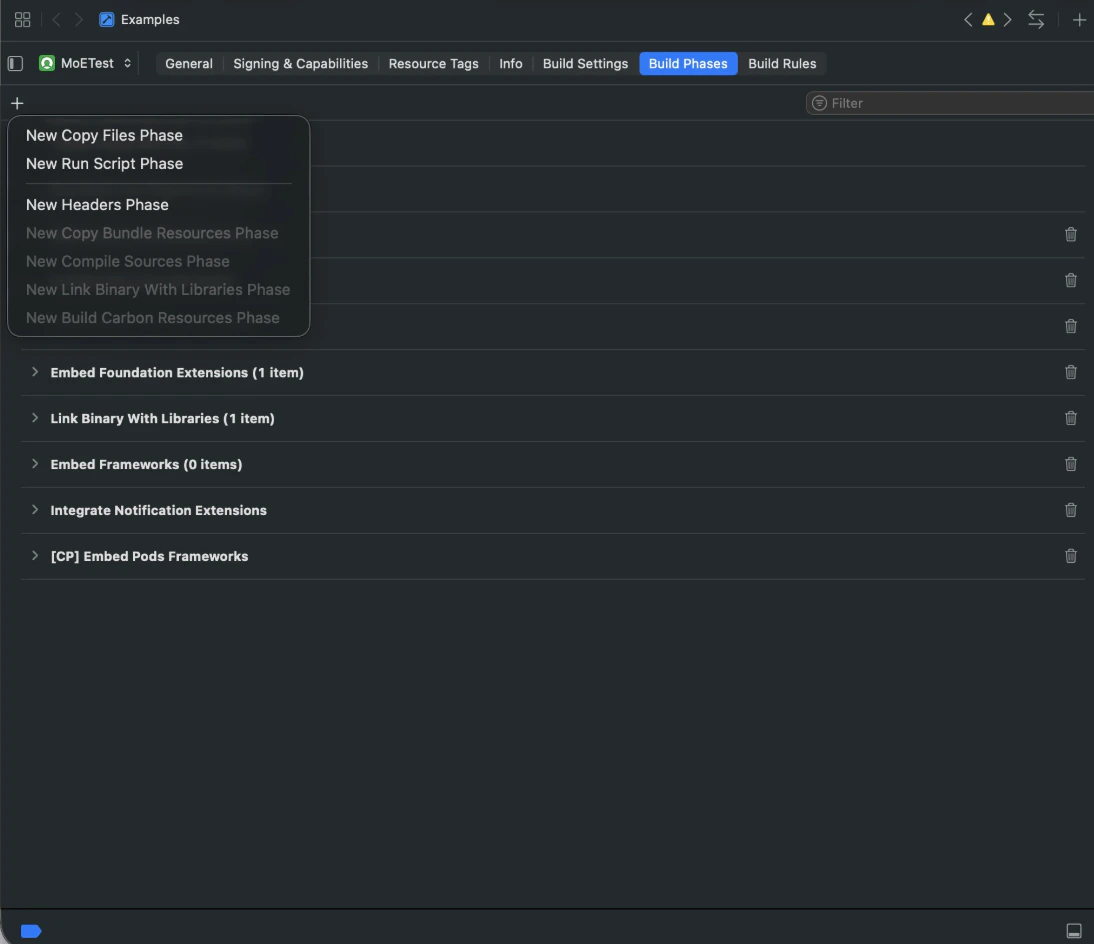 2. Add the following paths to the **Input Files** section:
* `$(BUILT_PRODUCTS_DIR)/$(INFOPLIST_PATH)`
* `$(INSTALL_DIR)/$(INFOPLIST_PATH)`
2. Add the following paths to the **Input Files** section:
* `$(BUILT_PRODUCTS_DIR)/$(INFOPLIST_PATH)`
* `$(INSTALL_DIR)/$(INFOPLIST_PATH)`
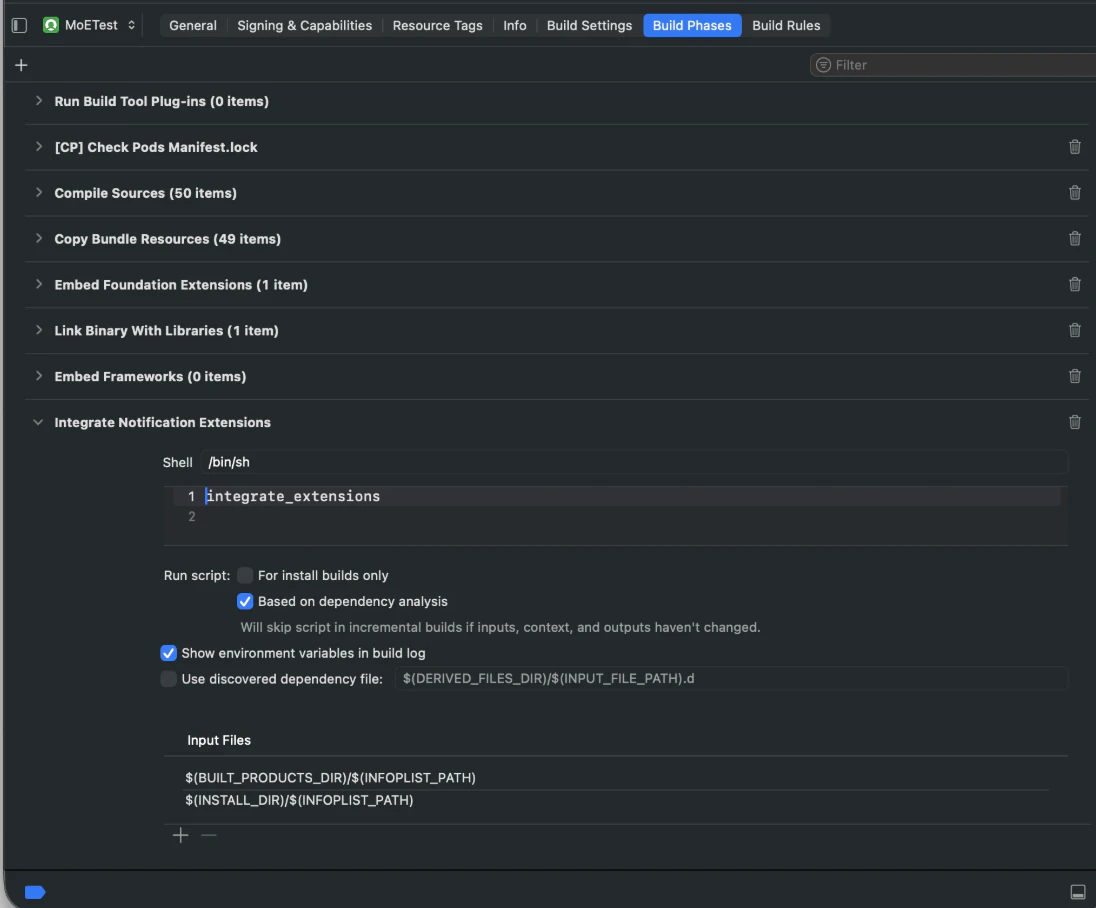 3. Enter the command relevant to your dependency manager, replacing `$OPTIONS` with your desired configuration:
```bash Swift Packet Manager (SPM) lines wrap theme={"theme":{"light":"github-light","dark":"github-dark"}}
${OBJROOT}/../../SourcePackages/artifacts/apple-sdk/moengage-extensions-integration/moengage-extensions-integration.artifactbundle/moengage-extensions-integration/bin/moengage-extensions-integration $OPTIONS
```
```bash CocoaPods lines wrap theme={"theme":{"light":"github-light","dark":"github-dark"}}
${PODS_ROOT}/MoEngageExtensionsIntegration/moengage-extensions-integration.artifactbundle/moengage-extensions-integration/bin/moengage-extensions-integration $OPTIONS
```
#### Available options
Replace `$OPTIONS` with one or more of the following:
| Option | Description |
| :--------------------------------------------------------------------- | :---------------------------------------------------------------------------------------------------------------------------------------------------------------------------- |
| `--enable-push-notification-templates` | Required if the content extension from Step 2 is used. |
| `--notification-service-extension-name $CUSTOM_SERVICE_EXTENSION_NAME` | Sets a custom name for the service extension. Use this when migrating to this tool from a custom service extension implementation. (Default: `MoEngageNotificationService`). |
| `--notification-content-extension-name $CUSTOM_CONTENT_EXTENSION_NAME` | Sets a custom name for the content extension. Use this when migrating to this tool from a custom content extension implementation. (Default: `MoEngageNotificationContent`). |
3. Enter the command relevant to your dependency manager, replacing `$OPTIONS` with your desired configuration:
```bash Swift Packet Manager (SPM) lines wrap theme={"theme":{"light":"github-light","dark":"github-dark"}}
${OBJROOT}/../../SourcePackages/artifacts/apple-sdk/moengage-extensions-integration/moengage-extensions-integration.artifactbundle/moengage-extensions-integration/bin/moengage-extensions-integration $OPTIONS
```
```bash CocoaPods lines wrap theme={"theme":{"light":"github-light","dark":"github-dark"}}
${PODS_ROOT}/MoEngageExtensionsIntegration/moengage-extensions-integration.artifactbundle/moengage-extensions-integration/bin/moengage-extensions-integration $OPTIONS
```
#### Available options
Replace `$OPTIONS` with one or more of the following:
| Option | Description |
| :--------------------------------------------------------------------- | :---------------------------------------------------------------------------------------------------------------------------------------------------------------------------- |
| `--enable-push-notification-templates` | Required if the content extension from Step 2 is used. |
| `--notification-service-extension-name $CUSTOM_SERVICE_EXTENSION_NAME` | Sets a custom name for the service extension. Use this when migrating to this tool from a custom service extension implementation. (Default: `MoEngageNotificationService`). |
| `--notification-content-extension-name $CUSTOM_CONTENT_EXTENSION_NAME` | Sets a custom name for the content extension. Use this when migrating to this tool from a custom content extension implementation. (Default: `MoEngageNotificationContent`). |